
Check the style and the record behind it
Zotero AMA 11th Edition Guide to Choosing Styles and Checking Metadata
Compare AMA style variants, then follow a real Zotero author correction from a single-field name to the right surname and initials.
A Zotero AMA 11th edition reference can have the right punctuation and still carry the wrong author name. The selected style controls how the stored information appears; the library record supplies that information. Our Zotero 10 test deliberately put a personal name in one field, generated an AMA preview, and corrected the record. Refreshing the preview changed Scott D Halpern to Halpern SD. Here is how to make the same checks before sending a paper.
Choose the intended AMA style variant
Search the Zotero Style Repository for AMA and read the complete title. The standard entry is AMA Manual of Style 11th edition. Similar entries add sorted alphabetically or parentheses to that name. Those words describe changes that can matter throughout a manuscript.
We inspected the three published CSL files. The standard style uses superscript citation numbers and has no alphabetical bibliography sort. The alphabetical variant sorts the bibliography by author, title, and date. The parentheses variant wraps citation numbers in parentheses without superscript formatting. Its bibliography keeps citation order.
Start with the requirements for your assignment or target journal. Choose a journal-specific style when its instructions require that variant, and compare a generated reference with the journal’s examples. A style containing AMA in its title can still implement different submission requirements.
| Style title ending | In-text numbers | Reference list order |
|---|---|---|
| 11th edition | Superscript | Order of citation |
| 11th edition (sorted alphabetically) | Superscript | Author, title, then date |
| 11th edition (parentheses) | Parentheses | Order of citation |
Install and select the style
Open Zotero Settings and choose Cite. Check the installed styles first. Our fresh Zotero 10 setup already included AMA Manual of Style 11th edition, so this test needed no additional style download.
If the required style is missing, choose Get additional styles, find the exact title in the repository, and install it. Zotero also supports adding a downloaded CSL file through the file-add control in the style manager. Older versions may show a plus button. Use the official repository link below to check the style’s identity.
For an existing connected manuscript, select the intended style in the Zotero plugin’s Document Preferences. Confirm that the current document uses it before editing individual references. For a standalone bibliography, select the style in the bibliography dialog.
Correct item type, names, dates, and journal metadata
Open the selected item’s Info pane and compare it with the original publication or a reliable bibliographic record. A journal article needs the Journal Article item type. Check that its title occupies the title field and its journal occupies Publication. Changing punctuation in a generated bibliography cannot repair a misplaced field.
For this example, we checked PubMed record 12140307. It identifies Scott D Halpern, Peter A Ubel, and Arthur L Caplan as the authors of Solid-organ transplantation in HIV-infected patients. The record gives 2002, volume 347, issue 4, pages 284-287, and DOI 10.1056/NEJMsb020632.
We entered a practice journal record manually, with Ubel and Caplan in separate surname and given-name fields. We deliberately entered Scott D Halpern as one full-name field. This was a constructed error for testing, with no claim that PubMed imports the author incorrectly.
Zotero treats a single-field creator as an unparsed name, which is useful for an organization. Personal authors normally need separate name parts so the citation style can produce surnames and initials. Keep all authors in the library record and let the selected style determine any shortening.
Check Journal Abbr separately from Publication. Our record stores The New England Journal of Medicine as the publication and N Engl J Med as its abbreviation. The current AMA CSL requests the short journal title and italicizes it. Also compare the publication year with the journal record; an access date describes a different event.
Verify that the corrected record updates the output
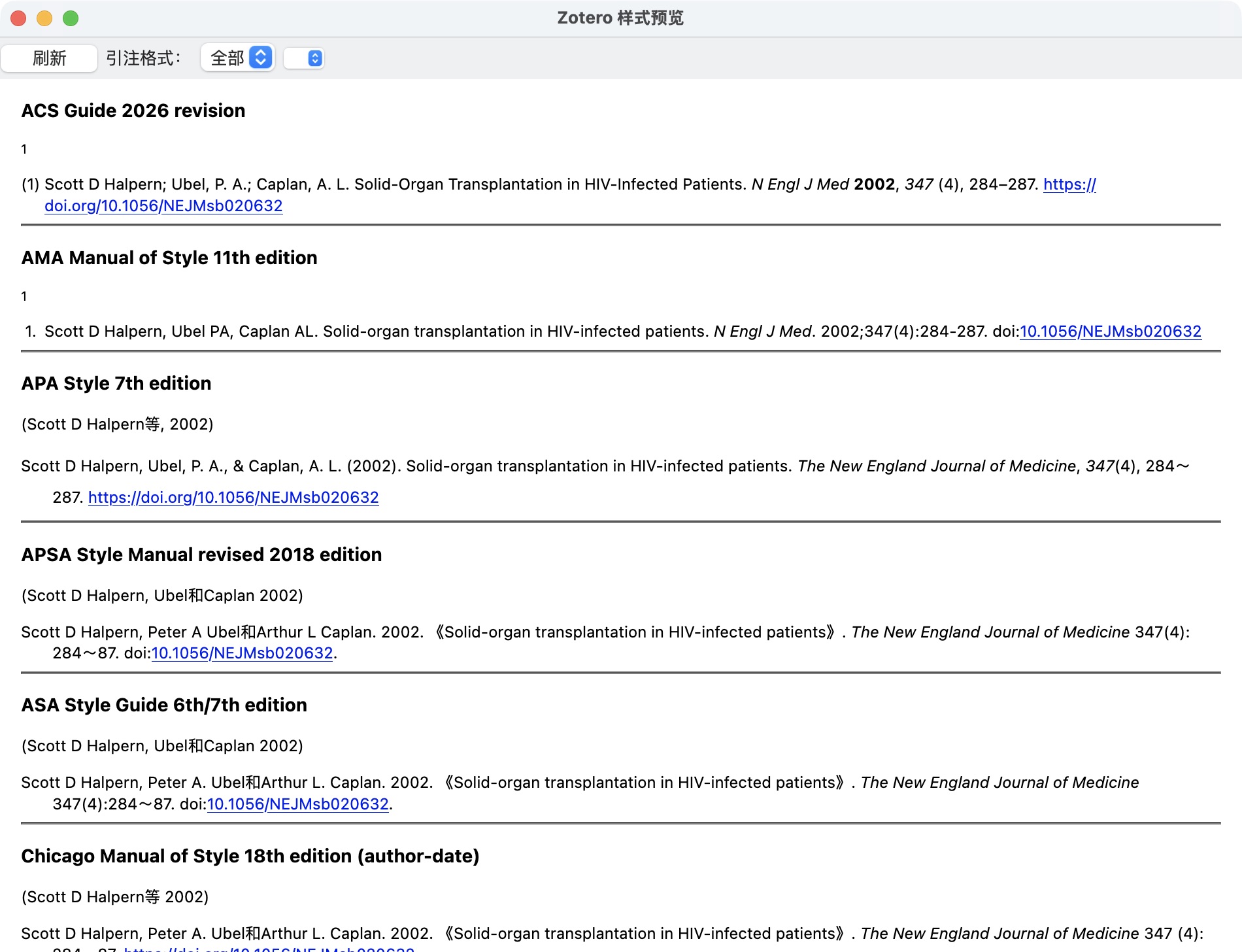
With the practice item selected, we opened Style Preview from the Cite settings and clicked Refresh. The AMA row began with Scott D Halpern, Ubel PA, Caplan AL. We saved that output before changing the author field.
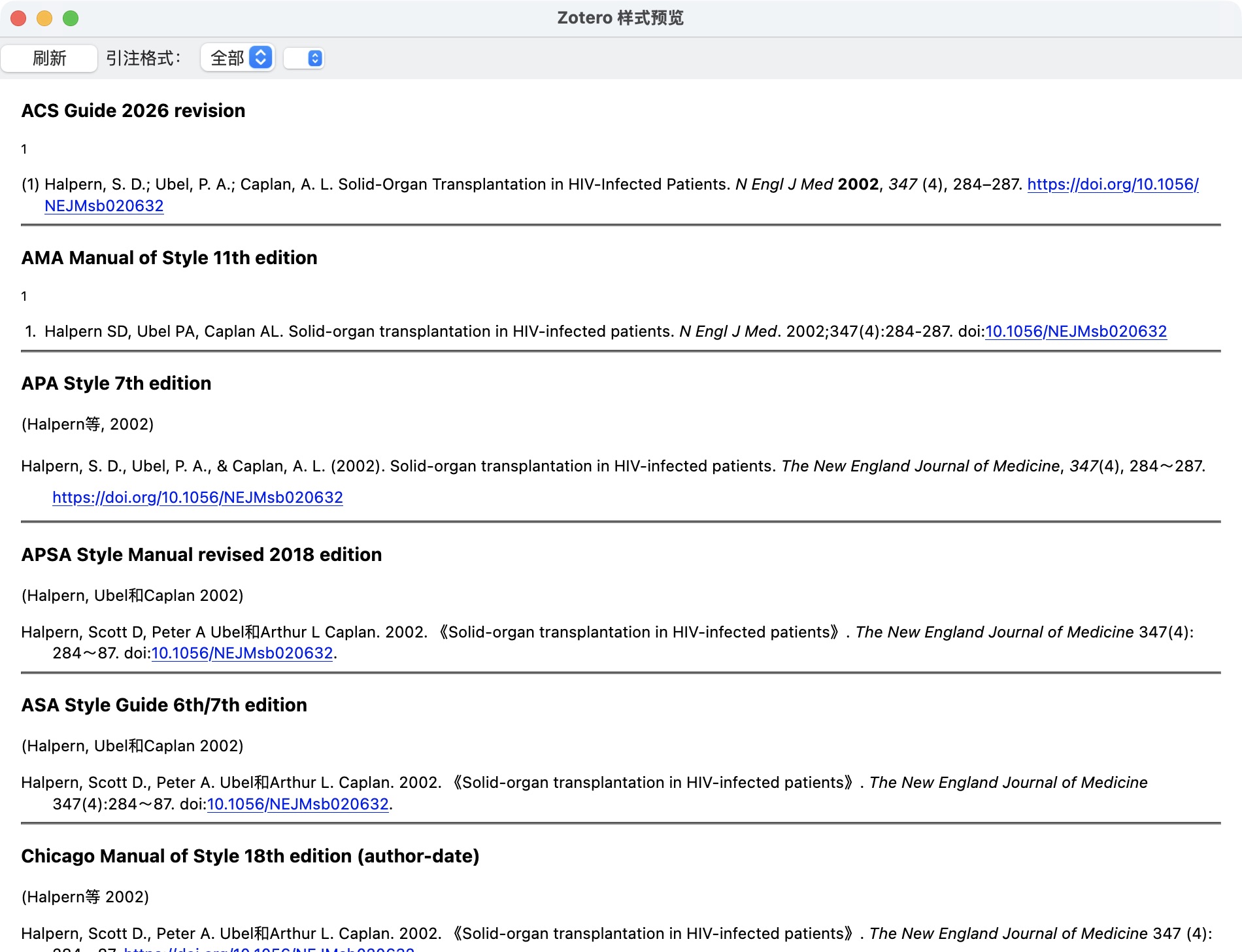
Back in the item, we switched the first creator to two fields. Zotero split this particular name into surname Halpern and given names Scott D. We checked both parts rather than assuming the split was correct, then reopened Style Preview and clicked Refresh again. The AMA row now began with Halpern SD, Ubel PA, Caplan AL.
Before the author-field correction
1. Scott D Halpern, Ubel PA, Caplan AL. Solid-organ transplantation in HIV-infected patients. N Engl J Med. 2002;347(4):284-287. doi:10.1056/NEJMsb020632
Deliberately incorrect personal-author formatting from the single-field test record.
After correction and preview refresh
1. Halpern SD, Ubel PA, Caplan AL. Solid-organ transplantation in HIV-infected patients. N Engl J Med. 2002;347(4):284-287. doi:10.1056/NEJMsb020632
Actual refreshed AMA preview. The remaining bibliographic details stayed unchanged.
Carry the correction into the document you will submit
Zotero’s plugin documentation says Refresh updates connected citations and the bibliography to reflect changed library metadata. In your manuscript, run that command after correcting the item, then inspect the affected reference. Our desktop test verified Style Preview only. A pasted bibliography is ordinary text and needs a newly generated replacement.
If the old name remains, check which library item the citation uses and whether the document still contains active Zotero fields. Manual bibliography edits can be overwritten on refresh. Keep a connected working copy for revisions and inspect the final export separately.
Use a separate generator for a short reference list
AMA Cite provides a separate way to prepare individual references when you do not need a managed library. Check the source details before copying the result into your draft. AMA Cite has no Zotero integration or affiliation, and pasted output will not refresh when a Zotero library item changes.
Convert an existing APA manuscript
Changing styles also changes how body citations connect to the reference list. Use the conversion guide’s original paragraph and source map to check narrative authors, repeated citations, and first-use order.